Metronome: Tempo
Frozen Ape Pte. Ltd.Music & Audio
3.7241.00 Reviews
- Version
- 5.1.6
- Installs
- 100.00K
- Age Rating
- Everyone
Screenshots
Our Review of Metronome: Tempo
 Analysis by Appyee
I reach for a metronome when I want practice to feel deliberate rather than hurried, and Metronome: Tempo is built around that simple job: giving musicians a steady pulse to work with. It suits a quick scale session as well as focused rhythm practice, though the right choice depends on how much you value a dedicated tool over a basic phone timer or a metronome built into another music app.
What a steady beat changes in practice
A click is useful not only for keeping a song at its target speed, but also for spotting where my timing slips. I might begin a passage slowly, listen for uneven notes, then raise the tempo only after the movement feels controlled. That makes a metronome most valuable when I treat it as a practice partner, not background noise. This app’s adjustable pace and rhythm options give that kind of work room to breathe.
It is a music and audio app from Frozen Ape Pte. Ltd. The Android version is a paid download at $1.49, with in-app purchases listed at $0.99 per item. Its age rating is Everyone, and its current version is 5.1.6. Those details make the cost worth considering before installing: if you only need a click once in a while, a free alternative may be enough; if you practise regularly, paying for a dedicated metronome can feel more sensible than putting up with an unrelated app’s extras.
Network-dependent moments and a practical routine
A metronome’s core job is local and immediate: set a pace, start the pulse, and play along. Still, I would not assume every part of the experience behaves the same way when a phone has no connection. Downloading the app, handling purchases, and checking for changes are moments where connectivity can matter, while ordinary practice should be judged by what the installed app actually allows on your device. I would test the exact setup I plan to rely on before taking it to a rehearsal or lesson, rather than discovering a restriction at the door.
Here is a realistic use: before leaving home, I choose a comfortable tempo for a difficult passage and make sure I can hear the beat through the setup I intend to use. At a lesson, I can focus on playing instead of fiddling with the phone. If I practise in a shared space, headphones keep the click contained; if I am working with another musician, a speaker may make it easier for both of us to follow. The useful habit is to check volume and output before starting, since a click that is clear in a quiet room can disappear under an instrument.
Connectivity is not a substitute for preparation. Bluetooth audio can be convenient, but wireless routing may introduce enough delay to feel distracting in timing-sensitive work, depending on the devices involved. For precision practice, I would compare the response with wired headphones or the phone’s own speaker and use whichever feels immediate. This is a practical trade-off, not a reason to avoid wireless altogether: freedom from a cable can matter more when rehearsing casually than when training a tight entrance.
First Impressions
Right off the bat, Metronome: Tempo impresses with its sleek and intuitive interface. It's like having a personal conductor right in your pocket. The app is available on both Android and iOS, so it’s accessible to pretty much everyone. As soon as you open it, you're greeted with a no-fuss, straightforward design that makes it easy to get started, even if you're not a tech wizard.
Features That Hit the Right Note
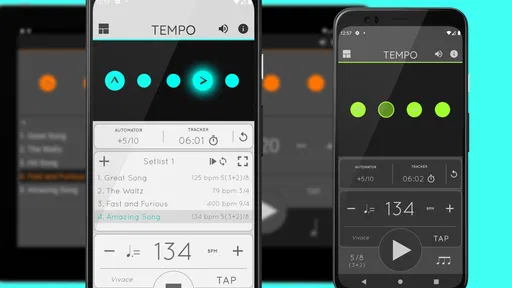
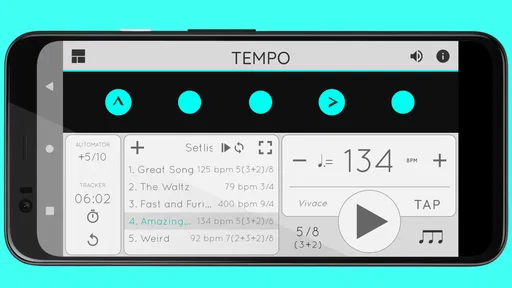
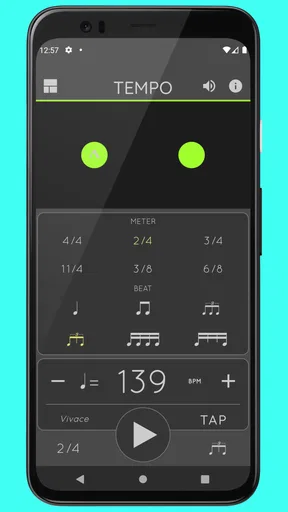
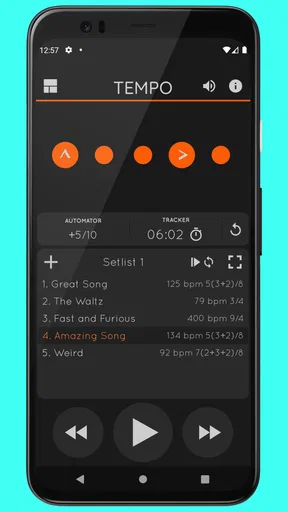
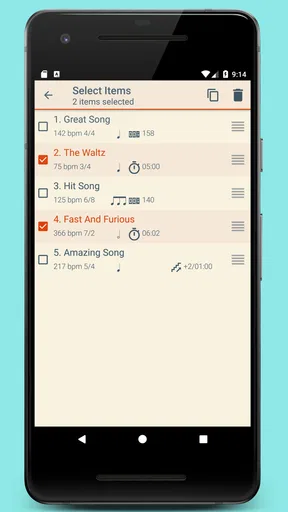
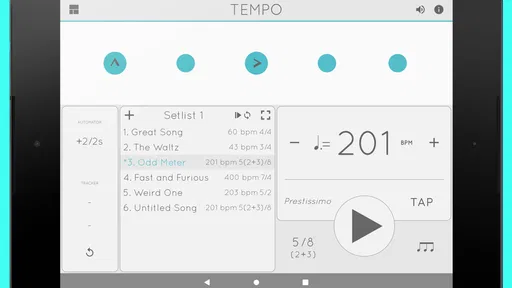
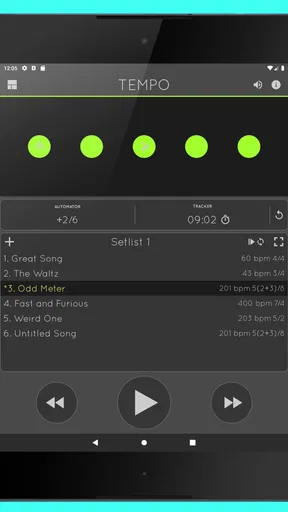
The app offers a plethora of features that cater to different musical needs. You can choose from a variety of time signatures and subdivisions, which is fantastic if you love experimenting with complex rhythms. It even lets you set up multiple setlists, making it perfect for live performances or practice sessions.
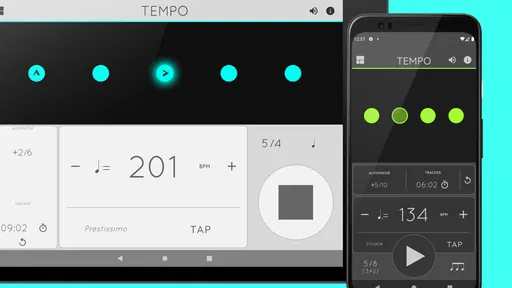
One standout feature is the ability to customize the tempo with precision. You can tap the tempo in manually or use the slider for more accuracy. Plus, the app has a tempo range from 10 to 400 BPM, covering all your musical bases.
One less obvious way I would use those controls is to separate tempo discovery from tempo training. I can tap along with a recording or a phrase in my head to find a starting point, then switch to the slider to settle on a repeatable pace. From there, subdivisions help me hear where the smaller beats sit inside the main pulse. For syncopated material, that can reveal whether I am rushing the offbeat or merely losing track of the larger count. It is a more deliberate workflow than repeatedly guessing a number and hoping the passage feels better.
Setlists are especially useful when the order of practice matters. I would group pieces or exercises by the kind of work they need—warm-ups first, then passages that need slow repetition, then material close to performance speed. That keeps a session from becoming a string of unrelated tempo changes. For a live player, the same idea can reduce setup fuss between pieces, although I would still rehearse the exact sequence beforehand rather than assume a phone screen will be convenient under stage pressure.
In Tune with Technology
One of the things I love about this app is how it integrates technology to enhance your playing experience. The visual feedback is stellar, with a large, easy-to-read display that shows the tempo clearly. It even offers vibration modes, so you can feel the beat, which is great if you’re practicing in a noisy environment or just want to get into the groove without staring at your screen.
Another cool aspect is the ability to sync with other devices. You can connect it to external speakers or headphones, which is a game-changer during rehearsals or gigs. It supports Bluetooth, so you can enjoy a wireless experience, keeping your practice sessions clutter-free.
There is a useful distinction between seeing, hearing, and feeling the pulse. The display helps when I can glance at the phone, vibration can be handy if the room is loud, and audio is the clearest choice when I need to lock into subdivisions. I would not treat vibration as a full replacement for an audible click in every situation; the physical cue may be harder to notice while handling an instrument, and its usefulness depends on how the phone is positioned. For hands-busy practice, placing the phone somewhere stable and visible can make the visual beat easier to catch between phrases.
For a small rehearsal, I would also think about who needs to hear the click. A headphone feed is private and avoids adding noise for everyone else, while a speaker lets a group share one pulse but can compete with the instruments. The app gives options for output, yet the room and the players determine which one works. I would start with a short test passage, adjust the volume, and make sure the click is audible without overpowering the music.
Keeping It Simple and Effective
While the app is packed with features, it doesn’t overwhelm you. The developers have done a fantastic job of balancing functionality with simplicity. It’s perfect for those of us who just want to get in and start playing without fussing over settings.
That balance matters most on a phone, where a narrow screen and instrument in hand can make deep menus feel like work. I would set the rhythm details before picking up a guitar or sitting at a keyboard, then leave the phone alone while playing. A dedicated metronome app has an advantage over a general music player here: it keeps the practice task in focus instead of surrounding the click with a library, recommendations, or playback controls.
The trade-off is that musicians who want everything in one place may prefer a recording or instrument-practice app with a built-in click. That can be more convenient when the session depends on recording, backing tracks, or other tools. A physical metronome is another sensible alternative if you want a separate device and do not want phone notifications nearby. I see this app as a strong fit for someone who already practises with a phone close at hand and wants a focused way to work on pulse.
When the phone gets in the way
A phone is convenient, but it is also easy to interrupt a session with a notification, a low battery, or an accidental tap. I would put the device in a stable spot, silence distractions where appropriate, and set the tempo before beginning a take. These small precautions matter more during a long rehearsal than during a quick warm-up. A metronome can keep time only if I can hear or see it consistently, so phone placement is part of the setup, not an afterthought.
If the click stops, becomes hard to hear, or seems out of sync with a wireless output, I would troubleshoot in a simple order: check that playback is active, confirm the selected audio route and volume, then try the phone speaker or another listening setup. If a setlist or tempo choice is not ready when I need it, I would pause and prepare the sequence before continuing rather than making changes mid-performance. Testing those basics at home is a better recovery plan than relying on last-minute fixes at a gig.
For a data-conscious routine, I would avoid unnecessary browsing or account-related tasks during practice and use the app for the task at hand. The key point is not to assume that every feature is independent of a connection; I would verify anything involving downloads or purchases when online, then test the practice setup itself in the conditions where I expect to use it. That is especially helpful before travel, a lesson in a building with weak reception, or an outdoor session where I may not want to depend on mobile service.
Why I Keep Coming Back
There's something comforting about knowing you have a reliable tool to help you stay in rhythm. For me, Metronome: Tempo has become an essential part of my practice routine. The app's ability to adapt to different musical styles and needs makes it incredibly versatile.
Whether I’m practicing scales, working on a tricky syncopation, or preparing for a performance, this app has my back. The customizable features ensure that I’m always playing at my best, and the user-friendly interface makes it a joy to use.
Its audience is broader than advanced players: a beginner can use a steady click to learn even spacing, while an experienced musician can make subdivisions part of more exacting rhythm work. The best results come from choosing a tempo that lets the passage stay relaxed and accurate, not from treating a higher number as progress by itself. I would raise the pace in small, considered steps and return to a slower setting whenever the beat starts exposing tension or unevenness.
How it fits among metronomes
There are plenty of ways to get a beat: a free basic metronome, a physical device, or a click inside a broader music app. Compared with a bare-bones alternative, this one is more appealing if you want time signatures, subdivisions, tempo adjustment, and setlists together. Compared with a physical unit, it is easier to carry alongside the phone you already use, but it shares the phone’s distractions and depends on the device’s audio behaviour. Compared with an all-in-one music tool, it keeps the focus on timing rather than offering a wider production or playback workflow.
Its Android presence is established, with over 100,000 installs and an average rating of 3.7 from around 1,800 ratings, alongside 241 written reviews. I would read that reception as a reason to check compatibility and try the controls yourself rather than treating any rating as a guarantee. The app has been available since April 3, 2012, and its roots include an earlier iOS version, but what matters in practice is whether the current release feels comfortable on your device. The minimum Android requirement is version 6.0.
One question I would ask before choosing it is whether the paid download makes sense for my routine. If I practise several times a week and will use the rhythm controls or setlists, a dedicated app is easier to justify. If I only need a steady click occasionally, a free metronome may meet that need. Another practical question is whether it will suit a group rehearsal: it can provide a shared pulse through an external speaker, but the room’s volume and the players’ positions still determine whether everyone can follow it.
Final Thoughts
In a world where there are countless metronome apps vying for attention, Metronome: Tempo stands out for its simplicity, reliability, and versatility. It’s like having your very own rhythm coach, and it’s always ready to help you keep time. Whether you’re a seasoned musician or just getting started, this app is a fantastic addition to your musical toolkit.
If you’re serious about improving your timing and rhythm, do yourself a favor and check it out. You won’t regret it, and who knows? It might just be the key to unlocking your full musical potential!
My recommendation is strongest for players who want a dedicated practice click with more control than a simple beep, especially if they will use its tempo adjustment, subdivisions, or setlists. I would skip it if I rarely practise with a metronome, prefer a standalone device, or need a broader recording and playback workspace more than a focused timing tool. Before relying on it away from home, I would check the audio route, prepare the tempo sequence, and test the phone in the setting where I plan to play. Those modest checks make the convenience of a phone-based metronome much more dependable.
Verdict
Strengths of Metronome: Tempo
- Highly customizable interface for precision.
- Supports various time signatures and rhythms.
- Clear, easy-to-read display during practice.
- Includes a variety of sound options.
- Stable performance with no lag issues.
Limitations of Metronome: Tempo
- Limited free features; in-app purchases required.
- No option for custom sound uploads.
- Lacks integration with external hardware.
- Advanced features can overwhelm beginners.
- No dark mode for low-light environments.
Similar Picks in This Category
View All
YouTube Music
Google LLC4.4

Samsung Music
Samsung Electronics Co., Ltd.3.8

Spotify: Music and Podcasts
Spotify AB4.3

JioSaavn - Music & Podcasts
Saavn Media Limited4.3

Lark Player:Music Player & MP3
Lark Player Studio - Music, MP3 & Video Player4.6

StarMaker: Sing Karaoke Songs
SKYWORK AI PTE. LTD.4.3
Frequently Asked Questions
What features does Metronome: Tempo offer to musicians?
Metronome: Tempo provides a comprehensive set of features tailored for musicians, including adjustable tempo settings, a wide range of time signatures, and customizable beat subdivisions. The app also offers setlist creation, a tap tempo function, and visual feedback to keep you on track. These features make it ideal for practice and performance settings.
Is Metronome: Tempo suitable for beginners?
Yes, Metronome: Tempo is designed to be user-friendly for beginners, while also offering advanced features for seasoned musicians. The intuitive interface allows new users to easily adjust settings and experiment with different tempos and time signatures. Tutorials and in-app guidance help beginners get started quickly and effectively.
Does Metronome: Tempo support different musical styles and instruments?
Absolutely, Metronome: Tempo is versatile and supports a wide variety of musical styles and instruments. From classical to rock, and from guitarists to drummers, the app’s extensive settings allow you to customize the metronome to suit your specific needs, making it a valuable tool for any musician.
Can I use Metronome: Tempo without an internet connection?
Yes, Metronome: Tempo is fully functional offline, which means you can use it anywhere, whether you're practicing at home, performing on stage, or jamming in a location without internet access. This makes it a reliable choice for musicians who need consistent tempo guidance on the go.
How does Metronome: Tempo compare to other metronome apps?
Metronome: Tempo stands out due to its blend of simplicity and advanced features. It offers more customization options and a cleaner interface compared to many other metronome apps. Additionally, features like setlist creation and the ability to save presets provide added convenience for musicians who require a dependable and flexible practice tool.
